
Plesk Licences
Last updated:
When selecting a Plesk license, it is important to choose the edition that best fits your needs. Below is a comparison of the three main Plesk license editions we offer: Plesk Web Admin Edition, Plesk Web Pro Edition, and Plesk Web Host Edition.
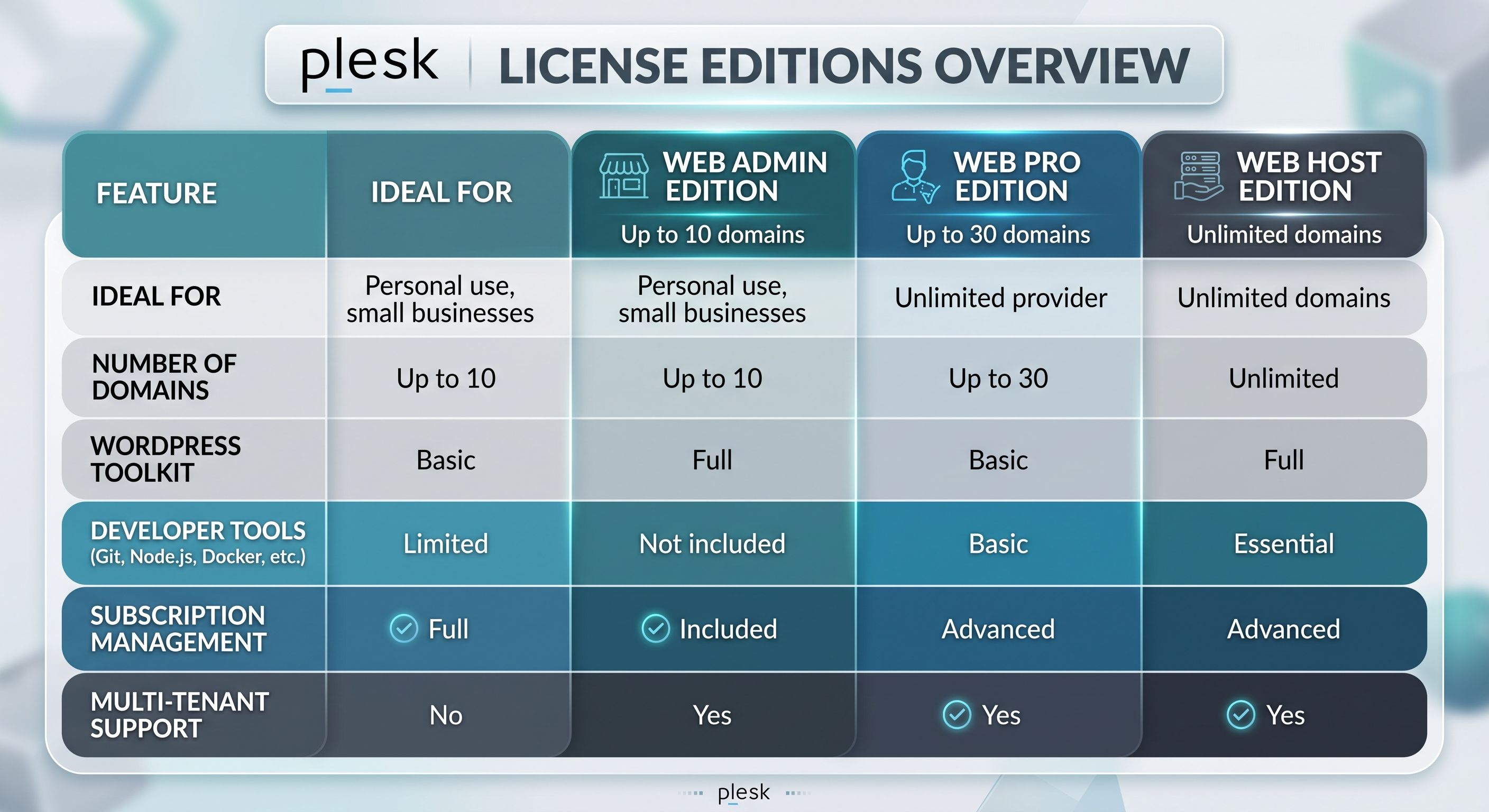
Key Differences Between Plesk Editions
Plesk Web Admin Edition is best for personal users or small businesses that manage a limited number of websites. It allows up to 10 domains and includes essential management features but lacks reseller capabilities. This is only Only available on our managed cloud servers (mcs or VS) servers and WP (WordPress) packages.
Plesk Web Pro Edition is suited for web professionals, developers, and agencies managing up to 30 domains. It provides advanced tools, including a full-featured WordPress Toolkit and expanded security options, but does not include reseller support. This Available on VS and MAS servers
Plesk Web Host Edition is designed for hosting providers and resellers who need unlimited domains, full subscription management, and reseller capabilities. It includes comprehensive security and multi-tenant support. Only available on MAS servers
On our WP (WordPress based hosting packages) we also provide WordPress Toolkit Deluxe (WPTD) which is an add on to the above licenses with the additional features of WordPress Toolkit Deluxe.
What is WPTD?
WordPress Toolkit Deluxe is an advanced management suite integrated into hosting control panels (such as cPanel and Plesk). It upgrades the basic, free WordPress management dashboard into a powerful tool for automating site updates, testing code, and securing installations. Key Features
- AI-Powered Smart Updates: Clones your site in the background, applies core/plugin/theme updates, tests for visual or functional breaks, and only updates your live site if everything works safely.
- One-Click Staging & Cloning: Duplicates a live site instantly into a sandbox environment to test design or plugin changes, then syncs those changes back to production.
- Bulk Management: Install, activate, or update plugins, themes, and PHP configurations across multiple WordPress sites simultaneously from a single panel.
- Mass Security Hardening: Scans sites against WordPress security best practices and applies one-click patches (such as restricting file execution or protecting sensitive directory access) across all installations
Why Upgrade?
Upgrading to WP Toolkit Deluxe is ideal for agencies, freelancers, e-commerce store owners, and businesses managing multiple sites.
- Eliminates Site-Breaking Updates: Removes the fear of automatic updates crashing your live revenue-generating pages.
- Saves Hours of Maintenance Time: Bulk updates and single-click tools drastically cut down repetitive administrative work.
- No Extra Plugins Needed: Reduces reliance on third-party security, backup, or staging plugins, improving overall server performance and reducing security attack surfaces.
Was this article helpful?
Thanks for the feedback! Glad it helped.
Sorry to hear that. What could be improved?
Thanks for your feedback — we'll use it to improve this article.